Project Details

Beacon: Enterprise incident management platform for IT operations teams

Beacon: Enterprise incident management platform for IT operations teams

Beacon: Enterprise incident management platform for IT operations teams

Beacon: Enterprise incident management platform for IT operations teams

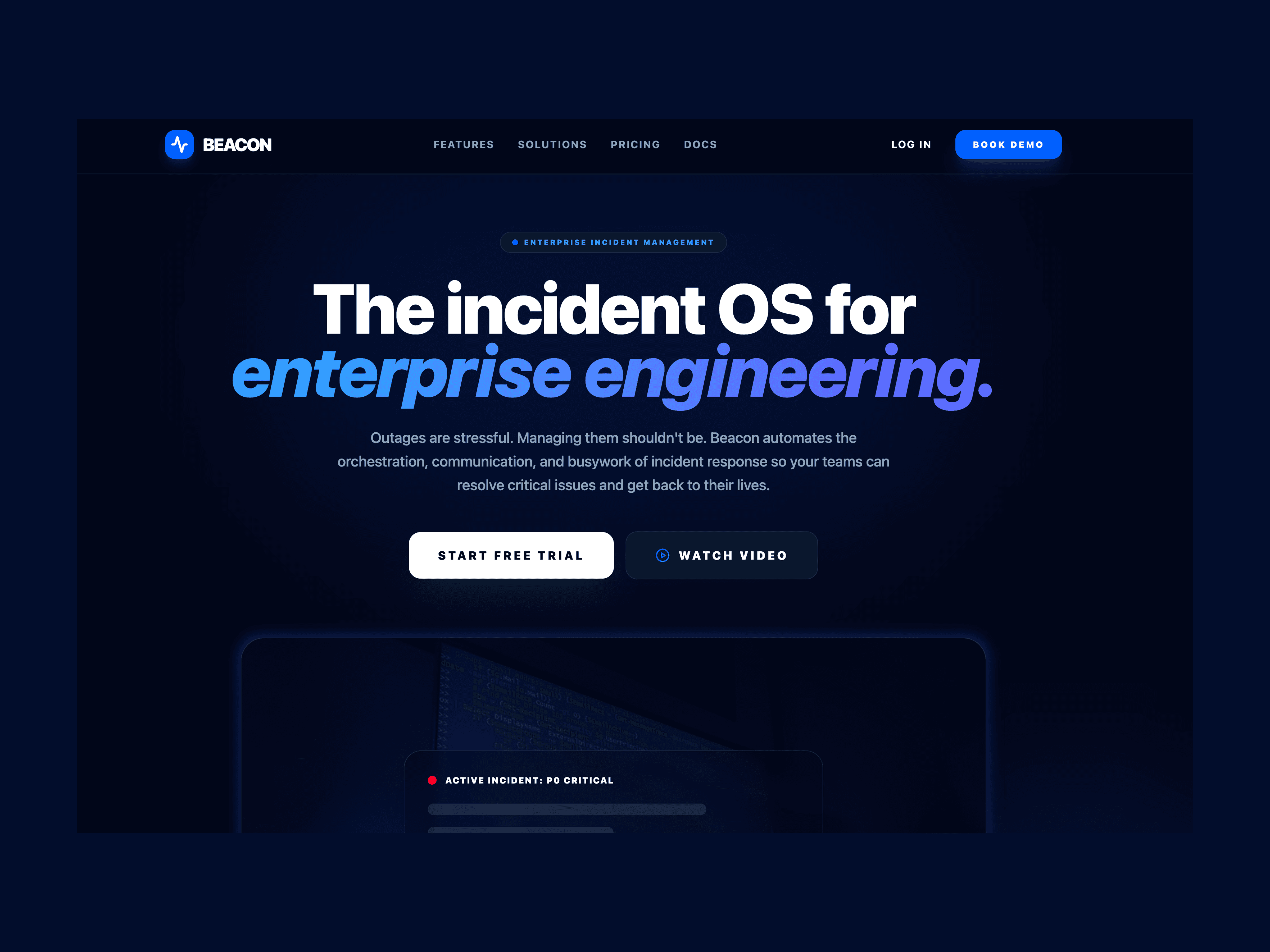
Hero title for an incident management tool

Project Overview

I led content design for Beacon, an enterprise incident management platform that helps IT ops teams respond to critical system outages. My role focused on transforming technical jargon into clear, action-oriented copy that reduces cognitive load during high-stress incidents.

The Problem

Enterprise incident management tools are used during some of the most stressful moments in an IT professional's career - when systems are down, customers are affected, and every second counts. Yet the tools designed to help often make things worse.

Key Research Findings:

- Engineers spend 40% longer resolving incidents due to confusing UI language

- 73% of on-call engineers report anxiety triggered by alert notifications

- Executives struggle to understand business impact from technical jargon

- New team members require 2-3 weeks of training to use incident tools effectively

Client:

Client:

Beacon

Beacon

My Role:

My Role:

Lead Content Designer

Lead Content Designer

Year:

Year:

2025

2025

Services:

Services:

Website & Web Application Content Design/UX Writing

Website & Web Application Content Design/UX Writing

The Challenge

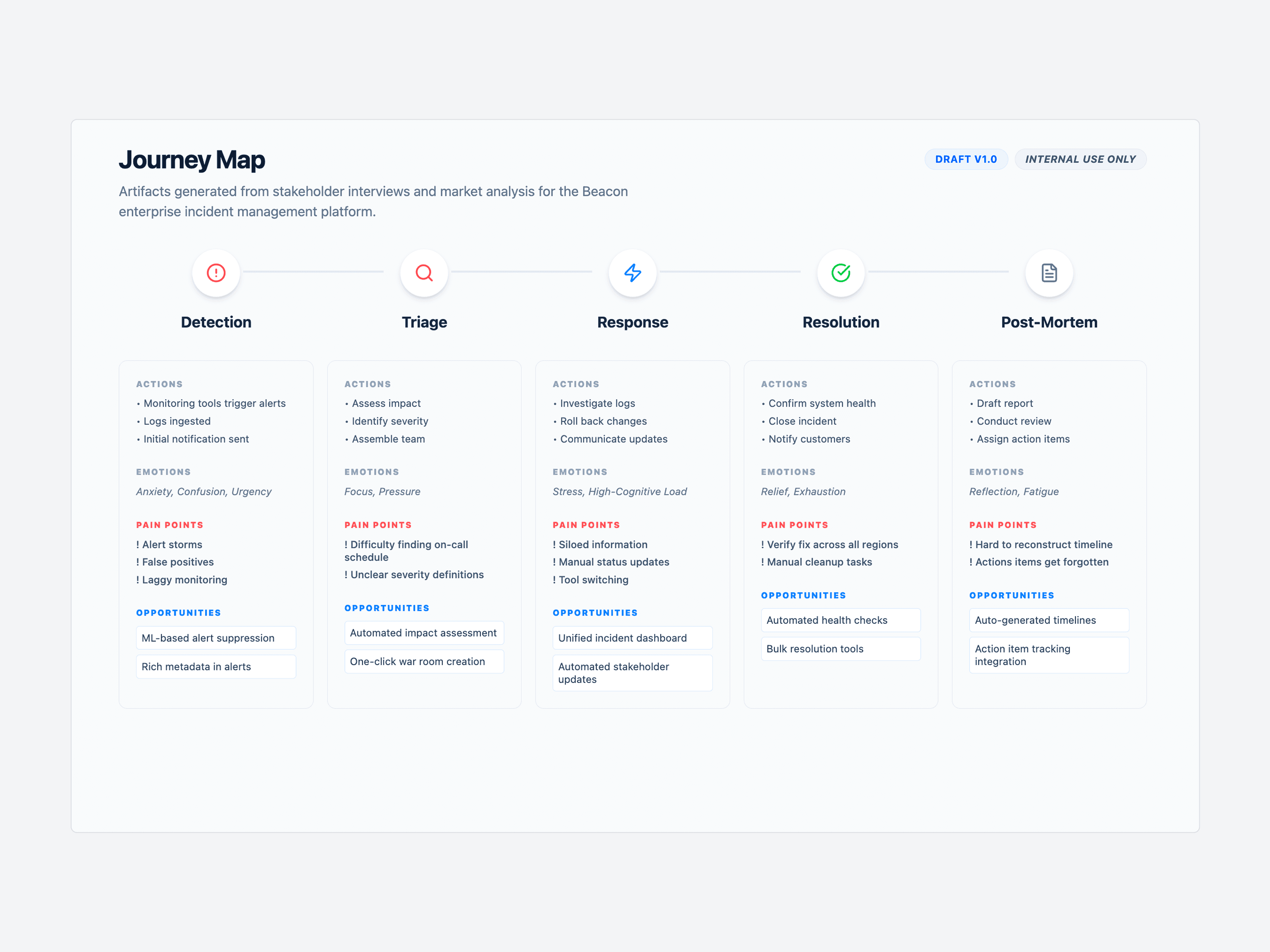
Engineers were spending 40% longer resolving P0 incidents because existing incident tools used corporate-speak and unclear severity labels. At 3 AM during a production outage, confusing UI copy was costing companies thousands per minute in downtime. Our user research showed that 73% of on-call engineers reported anxiety triggered by panic-inducing alert notifications, and new team members needed 2-3 weeks of training just to understand the interface.

"When I get paged at 3 AM, I shouldn't have to decode what the tool is telling me. I need to know what's broken and what to do next." — Senior SRE, Series B startup
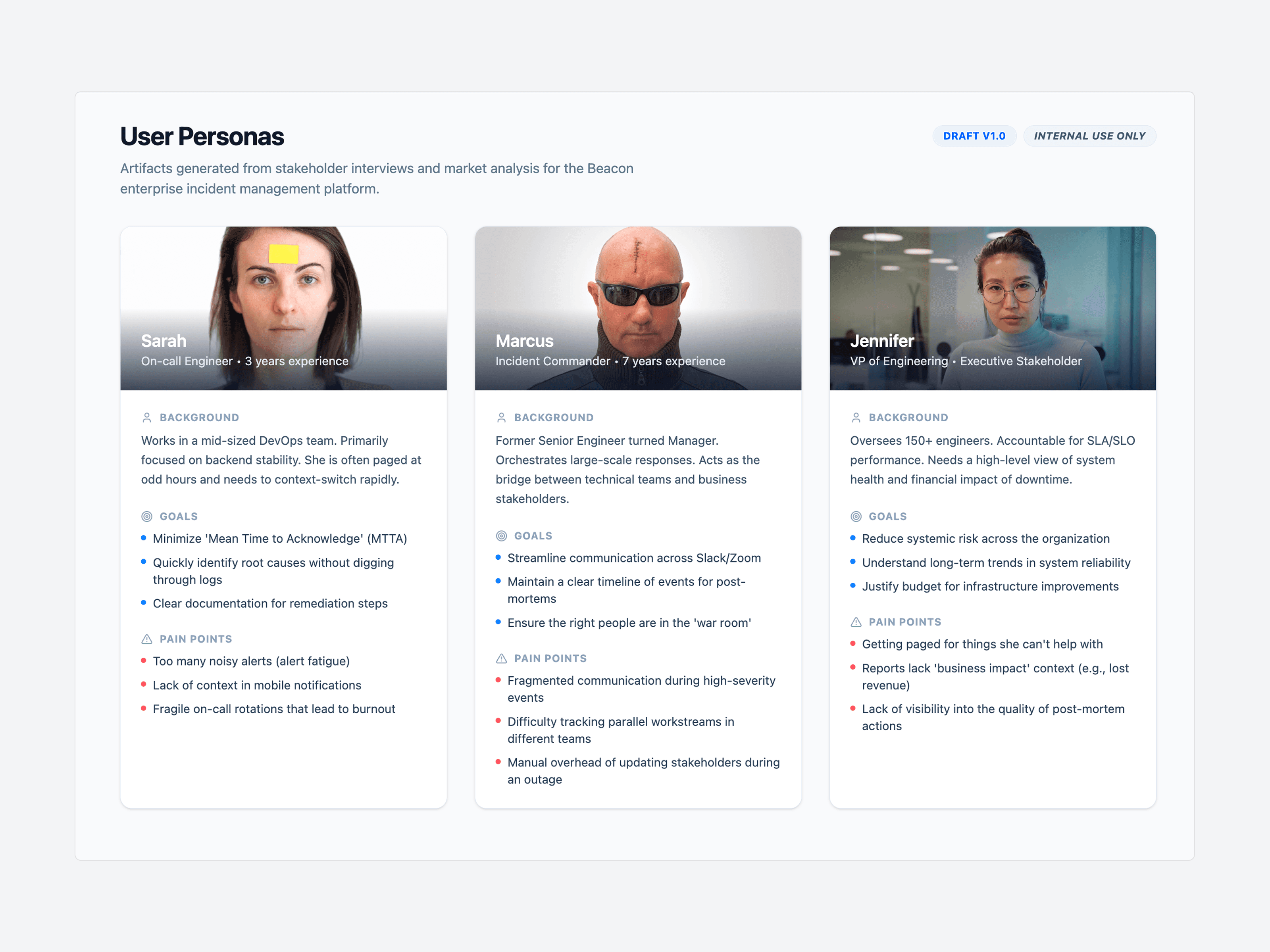
User persona for Beacon

Research & Mapping

To understand the content design problem, I conducted comprehensive user research and competitive analysis:

  1. Created three detailed personas representing different user types:

• Sarah (On-call Engineer, 3 years experience): Needs to assess severity quickly 

  and take action.

Pain point: "Too many alerts use 'critical' when they mean  'worth checking.'"

• Marcus (Incident Commander, 7 years experience): Coordinates cross-team response. 

  Pain point: "I waste time translating technical alerts for executives."

• Jennifer (VP of Engineering): Needs business impact visibility.

Pain point: "I can't tell if 'P1' means customers are affected or just internal tools."


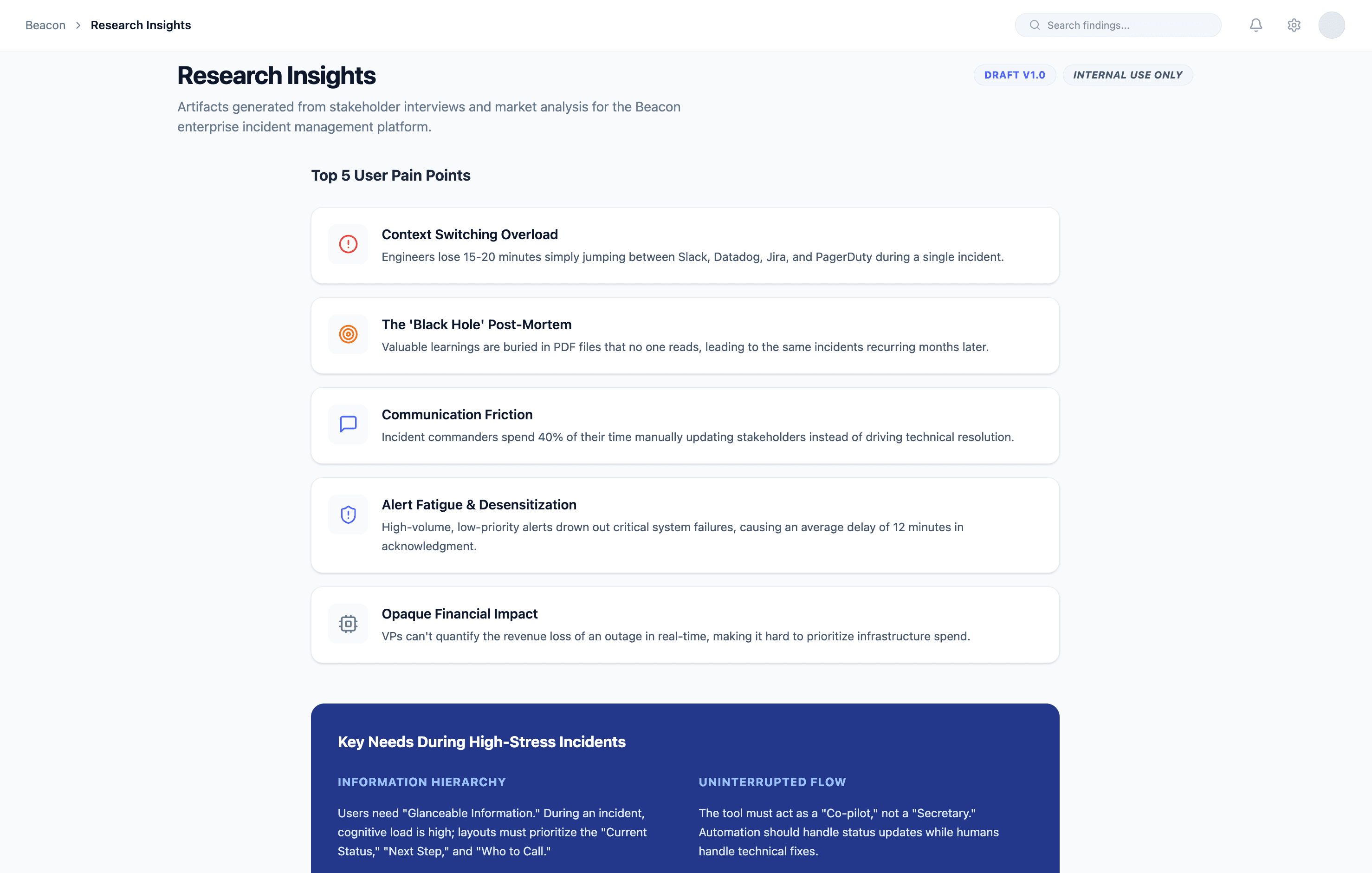
  1. Mapped user journey from incident detection through post-mortem, identifying key pain points at each phase: unclear severity labels during triage, lack of context during response, no guidance for post-incident documentation.
Research & Mapping

To understand the content design problem, I conducted comprehensive user research and competitive analysis:

  1. Created three detailed personas representing different user types:

• Sarah (On-call Engineer, 3 years experience): Needs to assess severity quickly 

  and take action.

Pain point: "Too many alerts use 'critical' when they mean  'worth checking.'"

• Marcus (Incident Commander, 7 years experience): Coordinates cross-team response. 

  Pain point: "I waste time translating technical alerts for executives."

• Jennifer (VP of Engineering): Needs business impact visibility.

Pain point: "I can't tell if 'P1' means customers are affected or just internal tools."


  1. Mapped user journey from incident detection through post-mortem, identifying key pain points at each phase: unclear severity labels during triage, lack of context during response, no guidance for post-incident documentation.

Research & Mapping

To understand the content design problem, I conducted comprehensive user research and competitive analysis:

  1. Created three detailed personas representing different user types:

• Sarah (On-call Engineer, 3 years experience): Needs to assess severity quickly 

  and take action.

Pain point: "Too many alerts use 'critical' when they mean  'worth checking.'"

• Marcus (Incident Commander, 7 years experience): Coordinates cross-team response. 

  Pain point: "I waste time translating technical alerts for executives."

• Jennifer (VP of Engineering): Needs business impact visibility.

Pain point: "I can't tell if 'P1' means customers are affected or just internal tools."


  1. Mapped user journey from incident detection through post-mortem, identifying key pain points at each phase: unclear severity labels during triage, lack of context during response, no guidance for post-incident documentation.

Research & Mapping

To understand the content design problem, I conducted comprehensive user research and competitive analysis:

  1. Created three detailed personas representing different user types:

• Sarah (On-call Engineer, 3 years experience): Needs to assess severity quickly 

  and take action.

Pain point: "Too many alerts use 'critical' when they mean  'worth checking.'"

• Marcus (Incident Commander, 7 years experience): Coordinates cross-team response. 

  Pain point: "I waste time translating technical alerts for executives."

• Jennifer (VP of Engineering): Needs business impact visibility.

Pain point: "I can't tell if 'P1' means customers are affected or just internal tools."


  1. Mapped user journey from incident detection through post-mortem, identifying key pain points at each phase: unclear severity labels during triage, lack of context during response, no guidance for post-incident documentation.

User research
User research
User research

Design Approach

COMPETITIVE ANALYSIS

Analyzed PagerDuty, Opsgenie, and Incident.io:

• Common issue: Overly technical language assumes expert knowledge

• Gap identified: No tools adapt content to user role

• Opportunity: Human-centered copy that reduces cognitive load during stress


Then,

I developed a content strategy centered on three principles:

  • 1. CALM URGENCY

    Why: Users are already stressed; our language shouldn't add to it.

    How: 

    - Remove panic-inducing language (no ALL CAPS, no exclamation marks for errors)

    - Use directive, confident tone that guides action

    - Reserve urgent language only for genuinely critical situations


    2. CONTEXT OVER DOCUMENTATION

    Why: During incidents, users won't read manuals. Help must be instant and contextual.

    How:

    - Inline help appears exactly when needed

    - Progressive disclosure prevents information overload

    - Smart defaults reduce cognitive load

    Example:

    Instead of a "Learn More" link to docs, show: "P0 = Complete outage affecting 

    customers. Response required within 15 minutes."


    3. HIERARCHY THROUGH LANGUAGE

    Why: Clear severity distinctions prevent decision paralysis and ensure appropriate response.

    How:

    - Consistent severity language (P0 through P4)

    - Status labels that communicate progress clearly

    - Role-based language adapts to audience needs

CONTENT AUDIT

Documented all existing microcopy touchpoints across the platform:

• 200+ UI strings using inconsistent terminology

• 15 different ways to describe incident severity

• Error messages that blamed users instead of guiding them

• No inline help—everything pointed to external documentation

KEY INSIGHT: Engineers don't have time to learn tool-specific jargon during a production outage. Content needed to be immediately scannable and action-oriented.

Design Approach

COMPETITIVE ANALYSIS

Analyzed PagerDuty, Opsgenie, and Incident.io:

• Common issue: Overly technical language assumes expert knowledge

• Gap identified: No tools adapt content to user role

• Opportunity: Human-centered copy that reduces cognitive load during stress


Then,

I developed a content strategy centered on three principles:

  • 1. CALM URGENCY

    Why: Users are already stressed; our language shouldn't add to it.

    How: 

    - Remove panic-inducing language (no ALL CAPS, no exclamation marks for errors)

    - Use directive, confident tone that guides action

    - Reserve urgent language only for genuinely critical situations


    2. CONTEXT OVER DOCUMENTATION

    Why: During incidents, users won't read manuals. Help must be instant and contextual.

    How:

    - Inline help appears exactly when needed

    - Progressive disclosure prevents information overload

    - Smart defaults reduce cognitive load

    Example:

    Instead of a "Learn More" link to docs, show: "P0 = Complete outage affecting 

    customers. Response required within 15 minutes."


    3. HIERARCHY THROUGH LANGUAGE

    Why: Clear severity distinctions prevent decision paralysis and ensure appropriate response.

    How:

    - Consistent severity language (P0 through P4)

    - Status labels that communicate progress clearly

    - Role-based language adapts to audience needs

CONTENT AUDIT

Documented all existing microcopy touchpoints across the platform:

• 200+ UI strings using inconsistent terminology

• 15 different ways to describe incident severity

• Error messages that blamed users instead of guiding them

• No inline help—everything pointed to external documentation

KEY INSIGHT: Engineers don't have time to learn tool-specific jargon during a production outage. Content needed to be immediately scannable and action-oriented.


Design Approach

COMPETITIVE ANALYSIS

Analyzed PagerDuty, Opsgenie, and Incident.io:

• Common issue: Overly technical language assumes expert knowledge

• Gap identified: No tools adapt content to user role

• Opportunity: Human-centered copy that reduces cognitive load during stress


Then,

I developed a content strategy centered on three principles:

  • 1. CALM URGENCY

    Why: Users are already stressed; our language shouldn't add to it.

    How: 

    - Remove panic-inducing language (no ALL CAPS, no exclamation marks for errors)

    - Use directive, confident tone that guides action

    - Reserve urgent language only for genuinely critical situations


    2. CONTEXT OVER DOCUMENTATION

    Why: During incidents, users won't read manuals. Help must be instant and contextual.

    How:

    - Inline help appears exactly when needed

    - Progressive disclosure prevents information overload

    - Smart defaults reduce cognitive load

    Example:

    Instead of a "Learn More" link to docs, show: "P0 = Complete outage affecting 

    customers. Response required within 15 minutes."


    3. HIERARCHY THROUGH LANGUAGE

    Why: Clear severity distinctions prevent decision paralysis and ensure appropriate response.

    How:

    - Consistent severity language (P0 through P4)

    - Status labels that communicate progress clearly

    - Role-based language adapts to audience needs

CONTENT AUDIT

Documented all existing microcopy touchpoints across the platform:

• 200+ UI strings using inconsistent terminology

• 15 different ways to describe incident severity

• Error messages that blamed users instead of guiding them

• No inline help—everything pointed to external documentation

KEY INSIGHT: Engineers don't have time to learn tool-specific jargon during a production outage. Content needed to be immediately scannable and action-oriented.


Design Approach

COMPETITIVE ANALYSIS

Analyzed PagerDuty, Opsgenie, and Incident.io:

• Common issue: Overly technical language assumes expert knowledge

• Gap identified: No tools adapt content to user role

• Opportunity: Human-centered copy that reduces cognitive load during stress


Then,

I developed a content strategy centered on three principles:

  • 1. CALM URGENCY

    Why: Users are already stressed; our language shouldn't add to it.

    How: 

    - Remove panic-inducing language (no ALL CAPS, no exclamation marks for errors)

    - Use directive, confident tone that guides action

    - Reserve urgent language only for genuinely critical situations


    2. CONTEXT OVER DOCUMENTATION

    Why: During incidents, users won't read manuals. Help must be instant and contextual.

    How:

    - Inline help appears exactly when needed

    - Progressive disclosure prevents information overload

    - Smart defaults reduce cognitive load

    Example:

    Instead of a "Learn More" link to docs, show: "P0 = Complete outage affecting 

    customers. Response required within 15 minutes."


    3. HIERARCHY THROUGH LANGUAGE

    Why: Clear severity distinctions prevent decision paralysis and ensure appropriate response.

    How:

    - Consistent severity language (P0 through P4)

    - Status labels that communicate progress clearly

    - Role-based language adapts to audience needs

CONTENT AUDIT

Documented all existing microcopy touchpoints across the platform:

• 200+ UI strings using inconsistent terminology

• 15 different ways to describe incident severity

• Error messages that blamed users instead of guiding them

• No inline help—everything pointed to external documentation

KEY INSIGHT: Engineers don't have time to learn tool-specific jargon during a production outage. Content needed to be immediately scannable and action-oriented.


My Solution

I developed a content strategy centered on three principles:

  • CALM URGENCY

Replaced panic-inducing language (ALL CAPS alerts, excessive exclamation marks) with direct, confidence-building copy.

  • ROLE-BASED LANGUAGE

Created adaptive content that surfaces different information based on user role:

  • CONTEXTUAL HELP OVER DOCUMENTATION

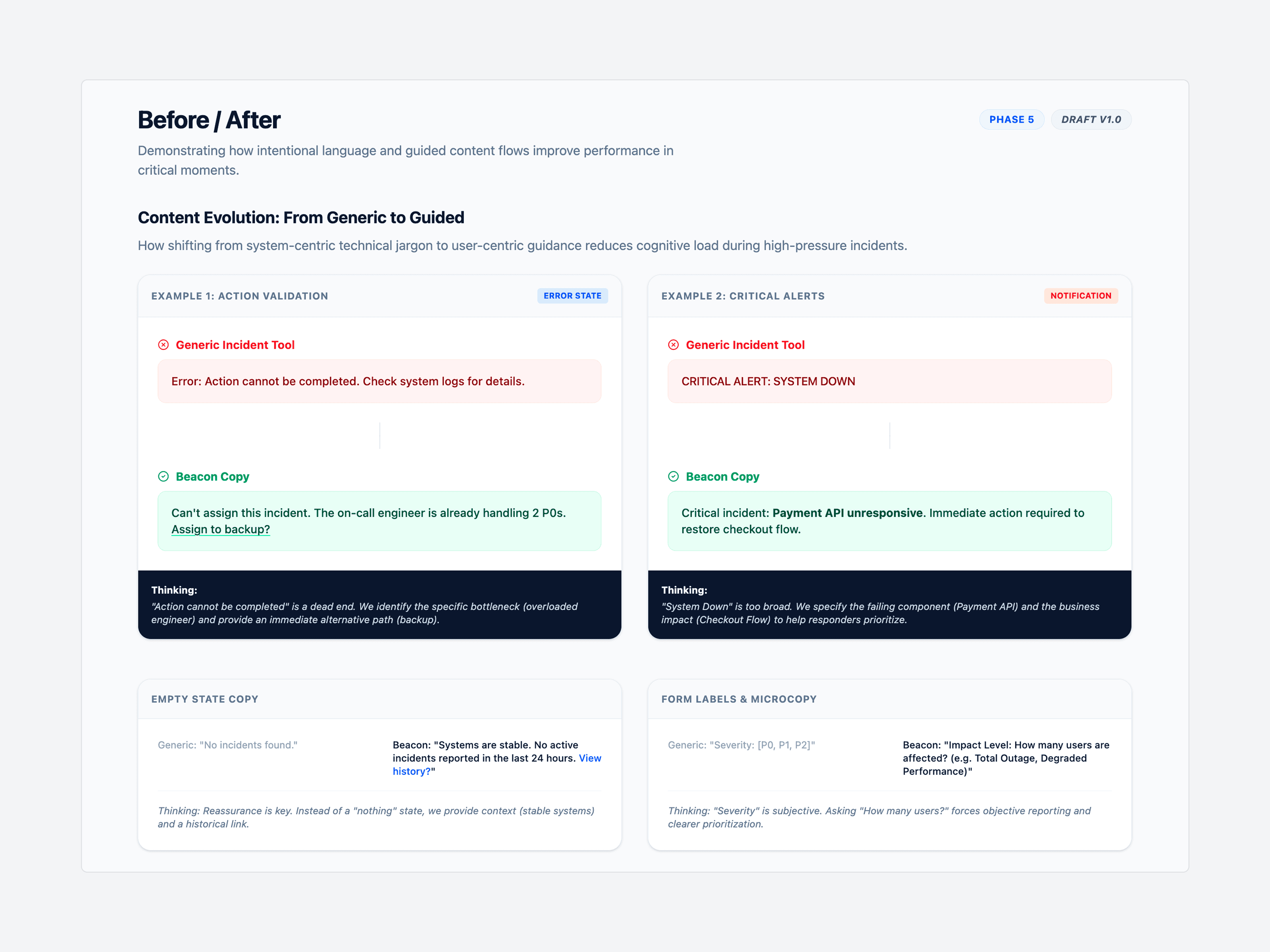
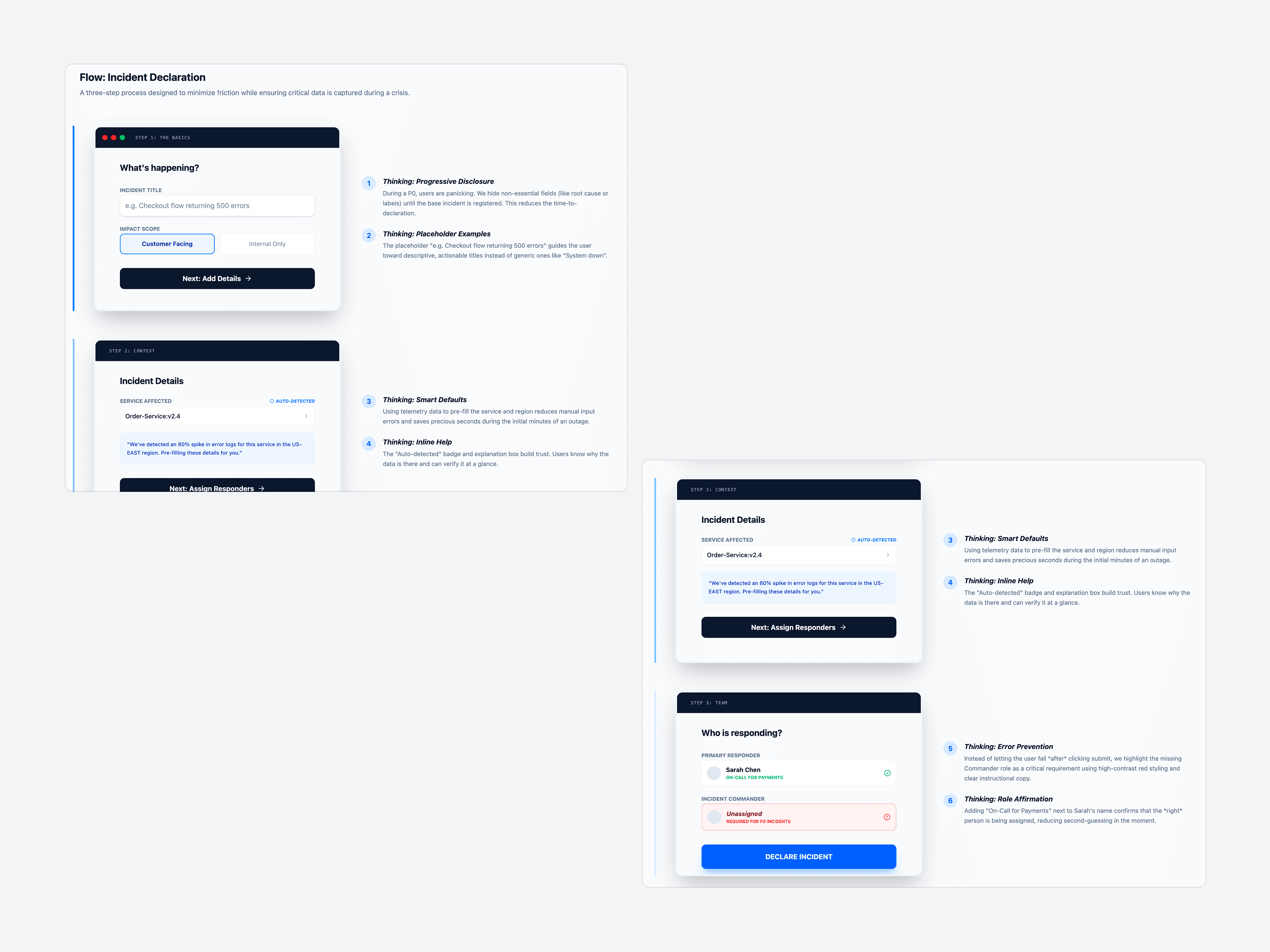
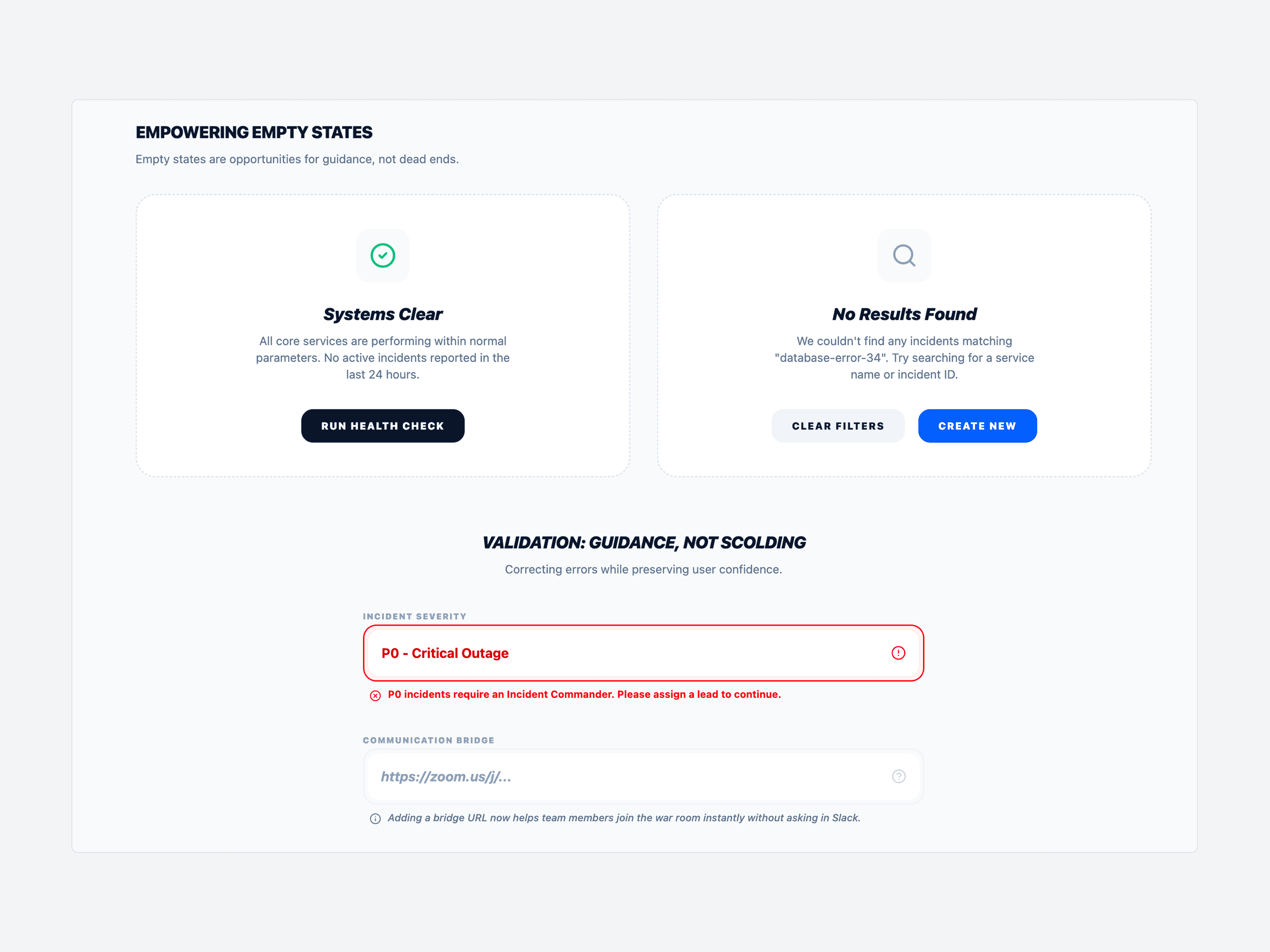
Replaced "View documentation" links with inline help that appears exactly when needed. For severity selection, added embedded descriptions:

"P0 - Critical: Complete outage affecting customers. Response required within 15 minutes. 


Key Decisions

1. Button label testing: "Acknowledge" vs "Accept" vs "I'm on it". Chose "Acknowledge" based on 94% comprehension vs 68-71% for alternatives.

2. Severity hierarchy redesign: Combined approach using "P0 - Critical" instead of numbers alone or vague labels. Result: 40% faster severity identification,  62% drop in misclassification.

3. 50-word message limit: Enforced brevity for all system notifications to respect engineers' time during crises.

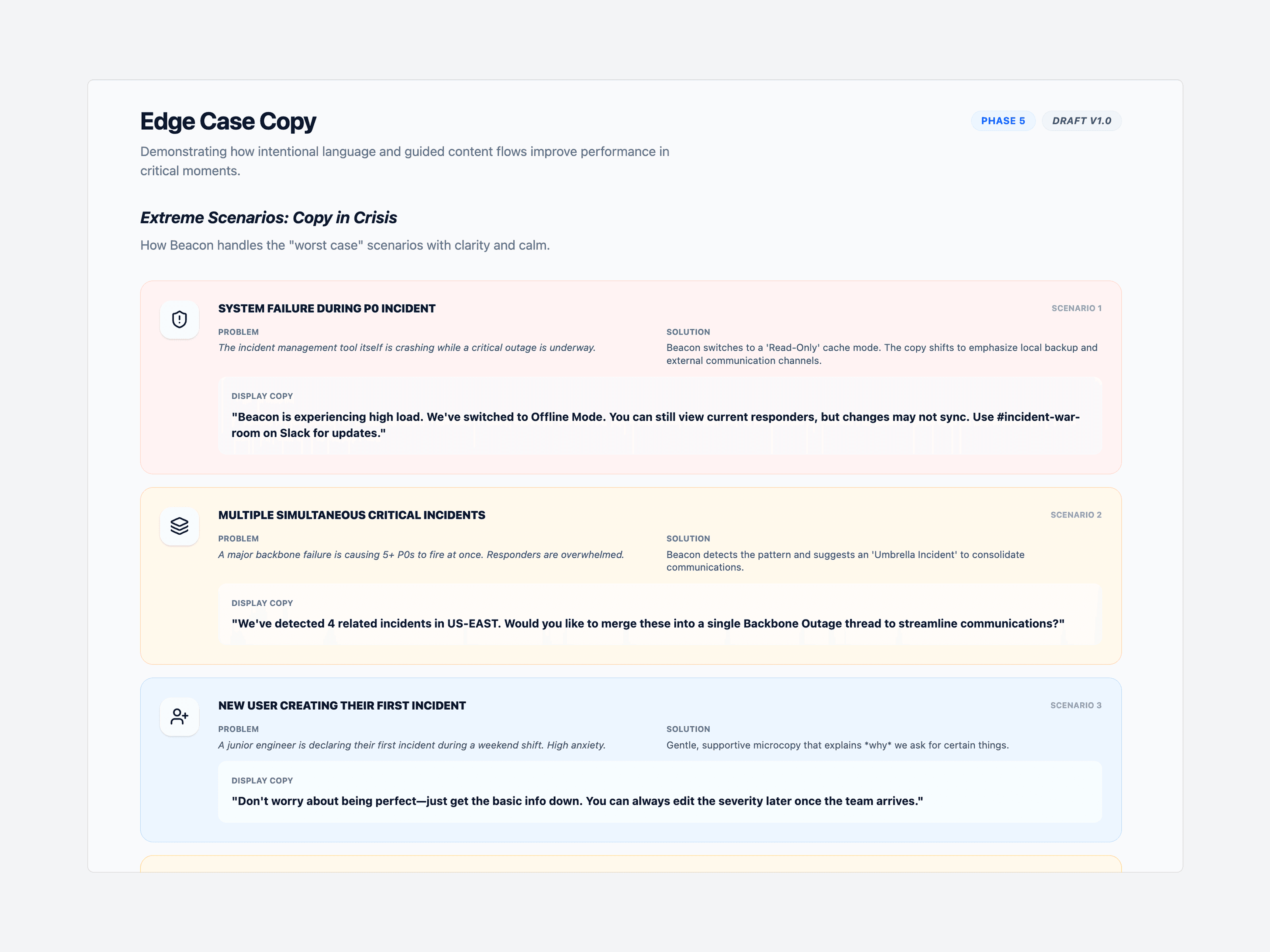
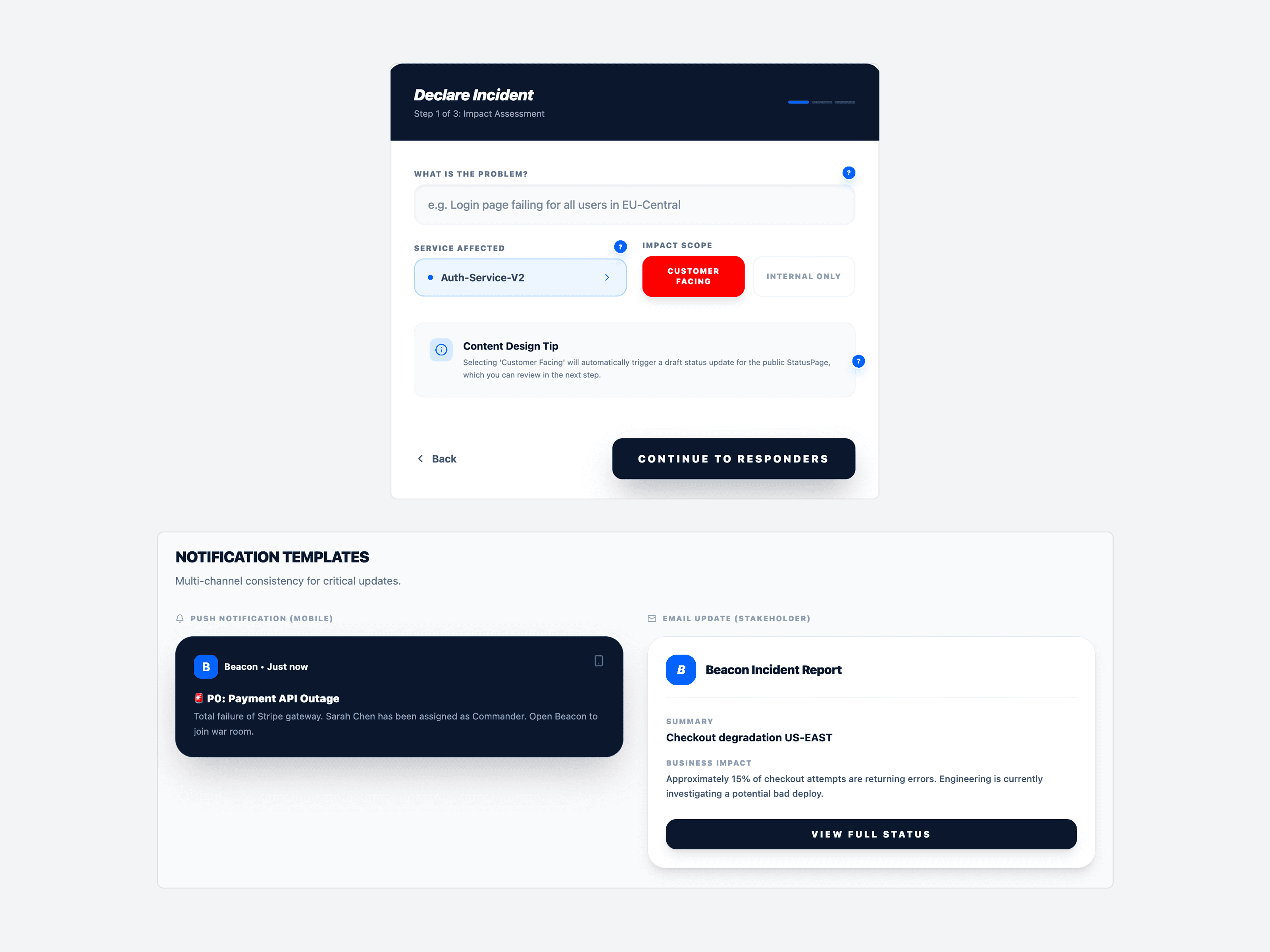
  1. Designed copy for empty states, notifications, edge cases, and system severity.
My Solution

I developed a content strategy centered on three principles:

  • CALM URGENCY

Replaced panic-inducing language (ALL CAPS alerts, excessive exclamation marks) with direct, confidence-building copy.

  • ROLE-BASED LANGUAGE

Created adaptive content that surfaces different information based on user role:

  • CONTEXTUAL HELP OVER DOCUMENTATION

Replaced "View documentation" links with inline help that appears exactly when needed. For severity selection, added embedded descriptions:

"P0 - Critical: Complete outage affecting customers. Response required within 15 minutes. 


Key Decisions

1. Button label testing: "Acknowledge" vs "Accept" vs "I'm on it". Chose "Acknowledge" based on 94% comprehension vs 68-71% for alternatives.

2. Severity hierarchy redesign: Combined approach using "P0 - Critical" instead of numbers alone or vague labels. Result: 40% faster severity identification,  62% drop in misclassification.

3. 50-word message limit: Enforced brevity for all system notifications to respect engineers' time during crises.

  1. Designed copy for empty states, notifications, edge cases, and system severity.
My Solution

I developed a content strategy centered on three principles:

  • CALM URGENCY

Replaced panic-inducing language (ALL CAPS alerts, excessive exclamation marks) with direct, confidence-building copy.

  • ROLE-BASED LANGUAGE

Created adaptive content that surfaces different information based on user role:

  • CONTEXTUAL HELP OVER DOCUMENTATION

Replaced "View documentation" links with inline help that appears exactly when needed. For severity selection, added embedded descriptions:

"P0 - Critical: Complete outage affecting customers. Response required within 15 minutes. 


Key Decisions

1. Button label testing: "Acknowledge" vs "Accept" vs "I'm on it". Chose "Acknowledge" based on 94% comprehension vs 68-71% for alternatives.

2. Severity hierarchy redesign: Combined approach using "P0 - Critical" instead of numbers alone or vague labels. Result: 40% faster severity identification,  62% drop in misclassification.

3. 50-word message limit: Enforced brevity for all system notifications to respect engineers' time during crises.

  1. Designed copy for empty states, notifications, edge cases, and system severity.

My Solution

I developed a content strategy centered on three principles:

  • CALM URGENCY

Replaced panic-inducing language (ALL CAPS alerts, excessive exclamation marks) with direct, confidence-building copy.

  • ROLE-BASED LANGUAGE

Created adaptive content that surfaces different information based on user role:

  • CONTEXTUAL HELP OVER DOCUMENTATION

Replaced "View documentation" links with inline help that appears exactly when needed. For severity selection, added embedded descriptions:

"P0 - Critical: Complete outage affecting customers. Response required within 15 minutes. 


Key Decisions

1. Button label testing: "Acknowledge" vs "Accept" vs "I'm on it". Chose "Acknowledge" based on 94% comprehension vs 68-71% for alternatives.

2. Severity hierarchy redesign: Combined approach using "P0 - Critical" instead of numbers alone or vague labels. Result: 40% faster severity identification,  62% drop in misclassification.

3. 50-word message limit: Enforced brevity for all system notifications to respect engineers' time during crises.

  1. Designed copy for empty states, notifications, edge cases, and system severity.

What I Learned
  • During high-stress situations, direct language wins every time. Tone is a luxury when systems are down.

  • Copy decisions shape user behavior. The language you choose in high-stakes UI isn't just words — it's instruction. Every label, every button, every status message tells a user what to do next. Getting it wrong costs time. Getting it right disappears into the background, which is exactly the point.

  • One message can't serve three audiences. Engineers, managers, and executives need different information about the same incident. The insight wasn't about writing more — it was about writing for the right person.
What I Learned
  • During high-stress situations, direct language wins every time. Tone is a luxury when systems are down.

  • Copy decisions shape user behavior. The language you choose in high-stakes UI isn't just words — it's instruction. Every label, every button, every status message tells a user what to do next. Getting it wrong costs time. Getting it right disappears into the background, which is exactly the point.

  • One message can't serve three audiences. Engineers, managers, and executives need different information about the same incident. The insight wasn't about writing more — it was about writing for the right person.
What I Learned
  • During high-stress situations, direct language wins every time. Tone is a luxury when systems are down.

  • Copy decisions shape user behavior. The language you choose in high-stakes UI isn't just words — it's instruction. Every label, every button, every status message tells a user what to do next. Getting it wrong costs time. Getting it right disappears into the background, which is exactly the point.

  • One message can't serve three audiences. Engineers, managers, and executives need different information about the same incident. The insight wasn't about writing more — it was about writing for the right person.

What I Learned
  • During high-stress situations, direct language wins every time. Tone is a luxury when systems are down.

  • Copy decisions shape user behavior. The language you choose in high-stakes UI isn't just words — it's instruction. Every label, every button, every status message tells a user what to do next. Getting it wrong costs time. Getting it right disappears into the background, which is exactly the point.

  • One message can't serve three audiences. Engineers, managers, and executives need different information about the same incident. The insight wasn't about writing more — it was about writing for the right person.

Create a free website with Framer, the website builder loved by startups, designers and agencies.